The menu bar gets crowded…
PelmetPelmet brings back
the calm.
the calm.
The icons you don't need tuck away and come back the instant you ask. Small, native, free.
Scroll, the bar answers
Continue, see features
The icons you don't need tuck away and come back the instant you ask. Small, native, free.
Move toward the bar and everything slides back out, exactly where it was. Click what you came for. It tucks itself away again.



 9:41 AM
A layout editor built for the bar: three sections (Visible, Hidden, Always Hidden) and every icon exactly where you drag it. The bar follows, live.
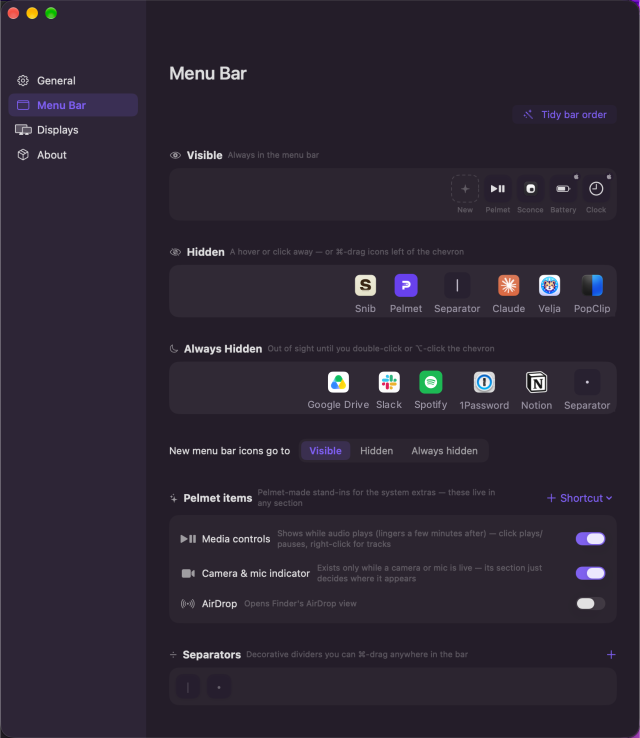
Hold ⌘ and drag any icon across the chevron, right in the bar, macOS's own gesture. Pelmet adopts it into the section where you drop it.
9:41 AM
App launchers. Pick any app and Pelmet gives it a menu bar icon. One click opens it, and it tucks away with the rest, so your favorites stay one hover away on every display.


 9:41 AM
Instant, Smooth, Fade. The bar plays each one so you pick by eye, not by name.
9:41 AM
No animation. The icons are just there.The slide macOS already does, out from under the chevron.In place. Nothing moves, they simply appear.
Pelmet is a small, native Mac app that minds its own business, which is your menu bar and nothing else. No triggers, no profiles, no second bar. Three sections and a chevron.
No Electron, no runtime. A real menu-bar citizen that starts at login and stays out of Activity Monitor's top ten.
No account, no analytics, no server. The only connection it ever makes is checking for its own updates.
The bar behaves per display. Reveal on the screen your pointer is on, stay tucked everywhere else.
Signed, notarized, updated in place via Sparkle, or ride the Homebrew tap.
Ten of them. English, German, French, Spanish, Italian, Portuguese, Japanese, Chinese, Korean, Russian. It follows your Mac, or pick one in Settings.
Media controls, AirDrop, a camera and mic light, your Shortcuts. Pelmet-made items that live in whichever section you like.
A narrow border of cloth or wood, fitted across the top of a window to conceal the curtain fittings. Now also: the same, for your menu bar.